Running the standalone Archive report
Adapted from the Leahy Consulting guide "Instructions for installing and running the complimentary PULSE Archive Standalone report program", April 2025.
The standalone Archive report is a free program that tells you the state of your Macola® database — how many records are in each file, by year. It reads and reports; it does not update any data. It exists to show you where the volume actually is before you decide whether archiving is worth doing.
If you already run Pulse Dashboard, the same report is built in — see Running the built-in Archive Report. This page is for sites without Pulse Dashboard.
Why the database slows down
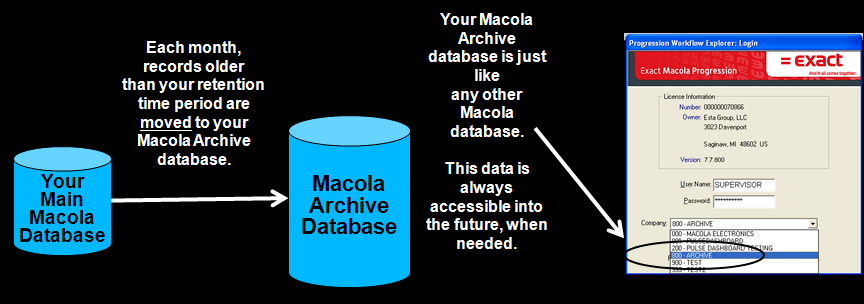
Macola® is a high-performance system, and it naturally takes longer to sort through data as more of it accumulates. Everyday tasks get slower every year. Pulse Archive removes unneeded data from the live Macola® database and moves it to a second Macola® database, so the live database is smaller and faster while the old data stays available.
Three steps
-
Download the program. The download link is in the fact sheet on leahyconsulting.com, or call (513) 723-8091 and we will send it.
-
Connect to your database. Select your SQL server and database names, key your login name and password — or tick Trusted Connection — and click Test Connection to confirm it is ready to run.

- Click Archive Report. Export the results to Excel.
What to do with the results
Send us the exported spreadsheet for a no-cost analysis. Based on many other Macola® installations, we will come back with recommendations for what to purge or archive. Call (513) 723-8091.
Purging, compressing GBKMUT and re-indexing are the other things worth doing to an aging database. Ask us which of them your site needs when you send the spreadsheet.
Support & contact
Our team is glad to help with anything from a quick question to a full implementation.
- PULSE software support — (513) 723-8095 · [email protected]
- Sales & product questions — (513) 723-8091 · [email protected]
- Consulting & Macola services — (513) 723-8094 · [email protected]