Grouped Column Headings
A Query Analyzer report can put its columns under shared headings. Name a column Group::Column in the query and PULSE Dashboard draws a band across every column in that group, with the group name above them and the column's own name underneath.
This is for the wide reports whose columns repeat in blocks — one block per vendor, per month, per location — where a flat run of near-identical names is hard to read across.
Naming the columns
The convention is the column alias, because the alias is the only thing that survives the trip from the query to the grid heading:
select v1.vend_name  as [Vendor 1::Vendor],
       v1.unit_price as [Vendor 1::Price],
       v2.vend_name  as [Vendor 2::Vendor],
       v2.unit_price as [Vendor 2::Price]
Vendor 1 and Vendor 2 each become a band spanning the two columns beneath them.
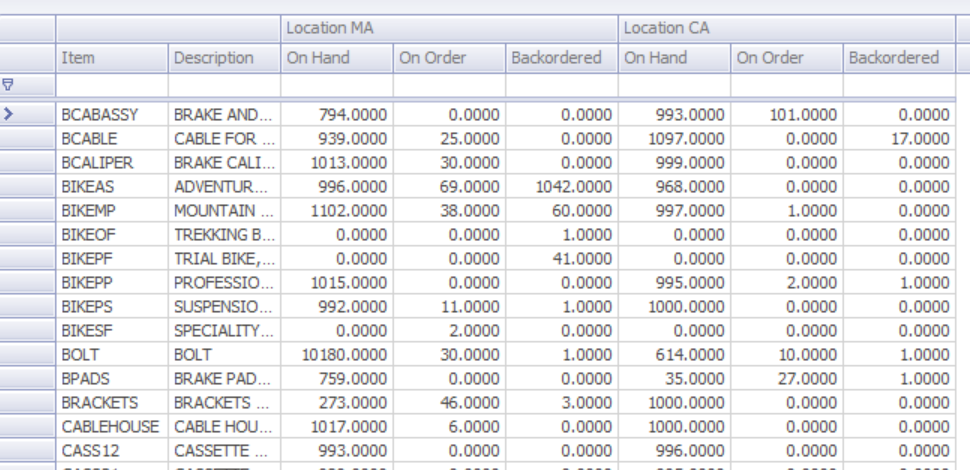
Columns named the ordinary way sit outside the bands, as Item and Description do above.
A second separator nests one level further: Pricing::Vendor 1::Price puts the Vendor 1 band inside a Pricing band. An alias with no :: in it is an ordinary column and is unchanged.
Display formats still apply
PULSE Dashboard picks a column's format from what its name contains — a $ gives currency, % a percentage, Qty or Quantity a quantity, Dt a date. With a band in front of the name, that match now runs against the whole alias, band included, so a column can pick up a format from the group it sits in.
Where that is wrong, name the format on the column. The braced format token a Query Analyzer report already understands works alongside the grouping, on grouped and ungrouped columns alike:
select count(*) as [Neg Qty 1::Vendors Priced{n0}]
Vendors Priced is a count under a band whose name contains Qty, so without the token it would draw as 3.00. The token sets the format and is stripped from the heading, on both the grouped and the ungrouped path.
Where it applies
Grouped headings are drawn on the Query Analyzer report and in the Advanced Query Analyzer. Where a query does not use the convention, the band row is hidden and the grid looks exactly as it did.
A report keeps its saved column layout
An existing Query Analyzer report is unaffected: it keeps the grid it always had, and the column layout its user saved still restores. A report whose query you deliberately give :: columns switches to the banded grid, and resets its saved column layout once when it does.