Inventory Optimization module
Adapted from the Pulse Dashboard fact sheets "Inventory Optimization Module" (September 2025) and "Supply Chain Module — selected screenshots" (January 2025).
Inventory optimization means holding enough stock to meet customer demand without tying up cash in the rest — using a forecast, replenishing at the right time, and holding the right amount of safety stock.
The Inventory Optimization module bundles eleven reports and utilities that were previously sold separately, at one price, plus somewhere to keep the customized reports you build yourself.
Previously the Supply Chain module
This module was introduced in January 2025 as the Supply Chain module and renamed to Inventory Optimization in September 2025. Same bundle, and the same eleven reports. If you were quoted for the Supply Chain module, this is what you were quoted for.
You must be licensed for the Designer module.
What is in the bundle
- Multi-level bill of materials
- ABC inventory class generator
- Recalculate item min, max, safety stock level and purchasing lead times
- MRP Action report (Crystal), with pegging
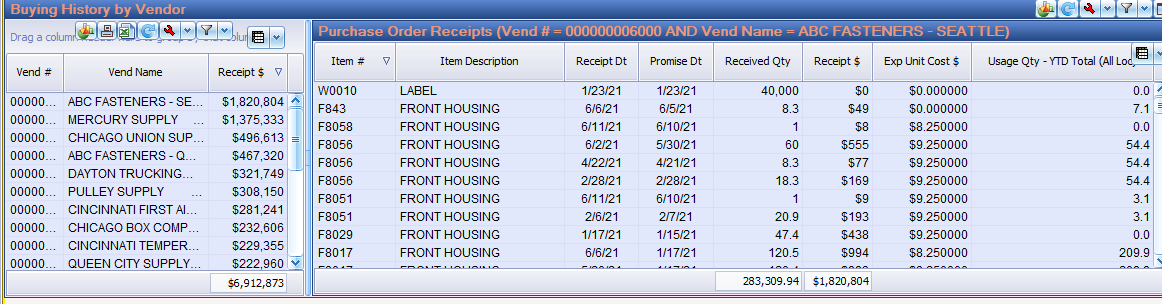
- Buying history by vendor and by item — two reports
- Purchase Order Generator
- Customer order component shortages
- Production order component shortages — separate reports for POP and Shop Floor
- Production order shortages showing pending purchase order receipts
- Shop order in-process variance analysis
- Shop order on-time performance analysis
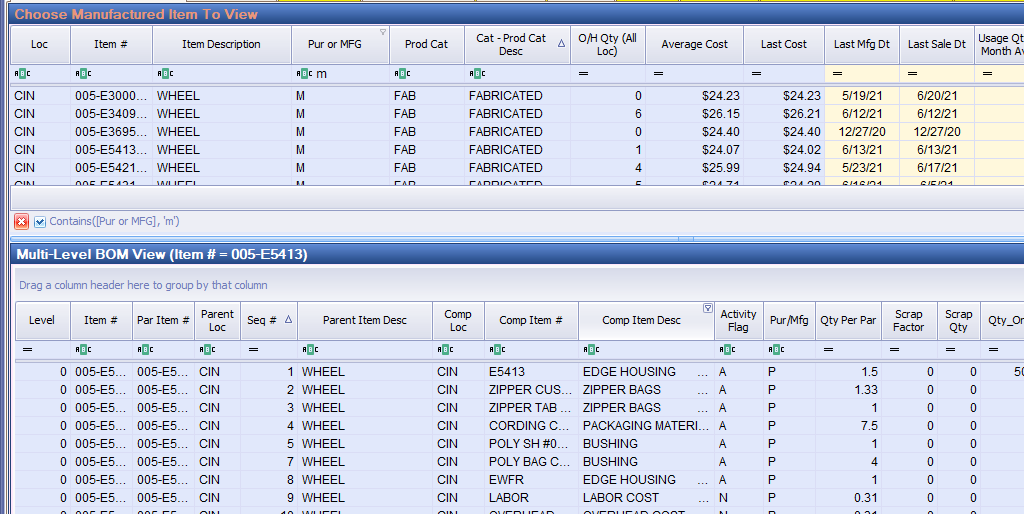
Multi-level bill of materials
An Advanced Screen Designer report in two panels. The top panel lists every manufactured item; click an item number and the lower panel shows its multi-level bill of material components.
The same report is documented in more depth, including the where-used variant, on Single and multi-level bills of material.
ABC inventory class generator
Assigning ABC codes manages inventory by dollar usage over the prior 12 months. Doing it by hand is slow enough that most companies do it once and never revisit it. The generator calculates and sets the class for each purchased or manufactured item.
Calculate ABC classes separately for purchased and manufactured items — the usage patterns are not comparable. See Inventory ABC Class Generator.

Recalculate reorder levels, order-up-to levels, safety stock and lead times
Ordering too early, too late, too much or too little all come back to the same four numbers: reorder level (minimum), order-up-to level (maximum), safety stock level and vendor lead time. The software follows your own rules for calculating them for each purchased and manufactured item, and you can override any recommendation.
See Recalculating replenishment levels.
MRP Action report with pegging
Crystal-based custom MRP Action reports present your Macola® MRP data in a readable format. The Detail report is for when you are not yet confident your Macola® MRP settings are right, or unsure whether the MRP regeneration is calculating what you need. Once you are comfortable with the regeneration results, the Summary report is the one you use daily.
Buying history by vendor and by item
Two Advanced Screen Designer reports giving an instant reading of the buying history of your top vendors or inventory items.
Purchase Order Generator
Creates purchase orders from your reorder levels, MRP computer-planned orders and production outside operations such as heat treating, following your own supply chain rules. See Purchase Order Generator.
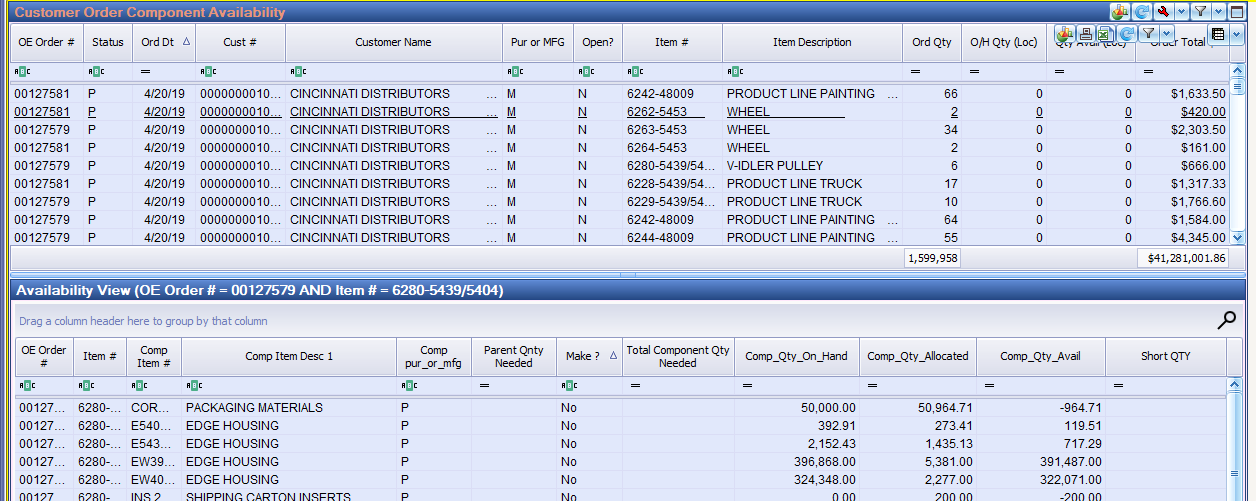
Component shortage reports
Four reports answer the same question at four points in the process.
Open customer order component shortages. Some organizations verify component availability as soon as a customer order arrives. Click a customer order number in the upper panel; the lower panel shows the summarized bill of materials for that item and pinpoints the components that will stop you manufacturing it.
Unreleased shop order component shortages. Check component availability before releasing to the shop floor. The top panel lists open shop orders; click a manufacturing order number and the lower panel shows the summarized bill of materials for the parent, with the components that will stop you.
Unreleased POP production order component shortages. The same report for POP orders.
Production order shortages showing open purchase orders. When something is short the question is always "do I have it on order, how many, and when does it land?" — for purchased and manufactured items alike. The upper panel shows only production orders that have shortages; click an item number and the lower panel shows open purchase orders, quantities and scheduled arrival dates.
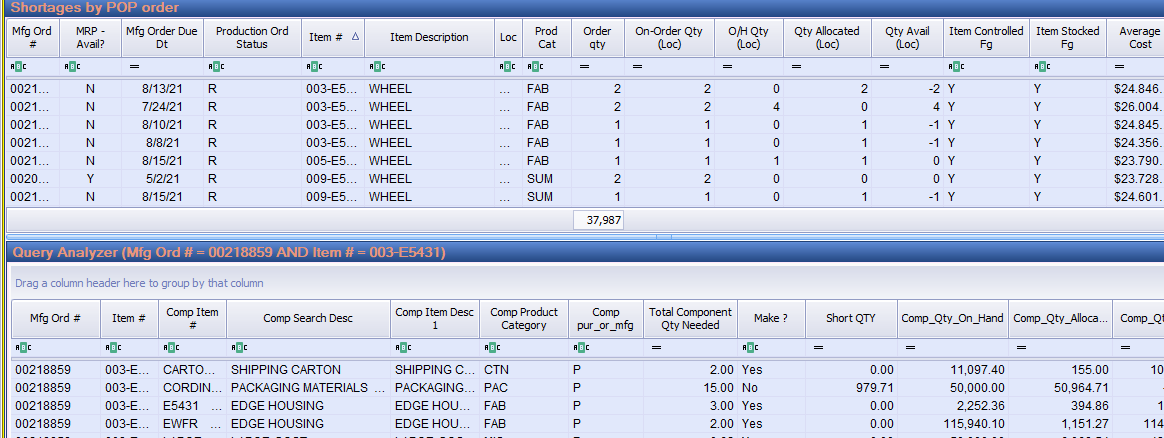
Shop floor analysis
In-process variance analysis is a customized version of the standard Shop Floor Order View report, for analyzing labor hours and component variances, with drill-down on the lower two panels.
On-time performance analysis is the same report configured to pinpoint manufactured items that consistently finish late.
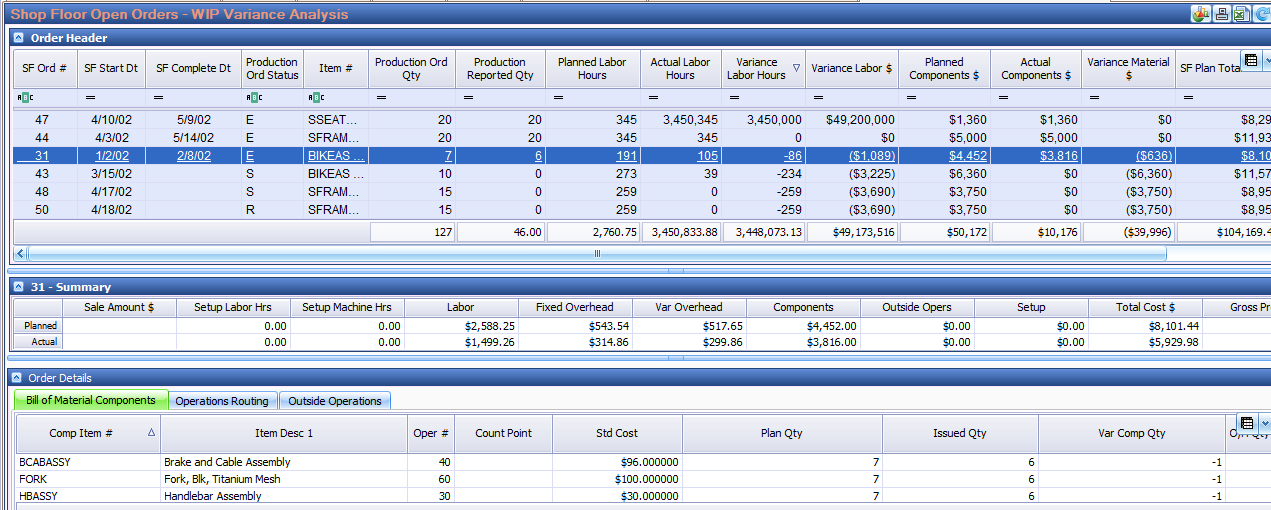
More on the shop floor reports, including the employee efficiency and labor variance reports, is at Shop floor labor reports.
Resources on leahyconsulting.com
- Inventory Optimization module fact sheet (PDF) — The printable fact sheet, September 2025
Support & contact
Our team is glad to help with anything from a quick question to a full implementation.
- PULSE software support — (513) 723-8095 · [email protected]
- Sales & product questions — (513) 723-8091 · [email protected]
- Consulting & Macola services — (513) 723-8094 · [email protected]