Toolbar Quick Search
A search box on the main toolbar finds any tab or report and takes you straight to it. Start typing and the list narrows as you type; pick an entry and PULSE Dashboard navigates to it.
Ctrl+K puts the cursor in the box from anywhere in the application, so you can reach a report without leaving the keyboard.
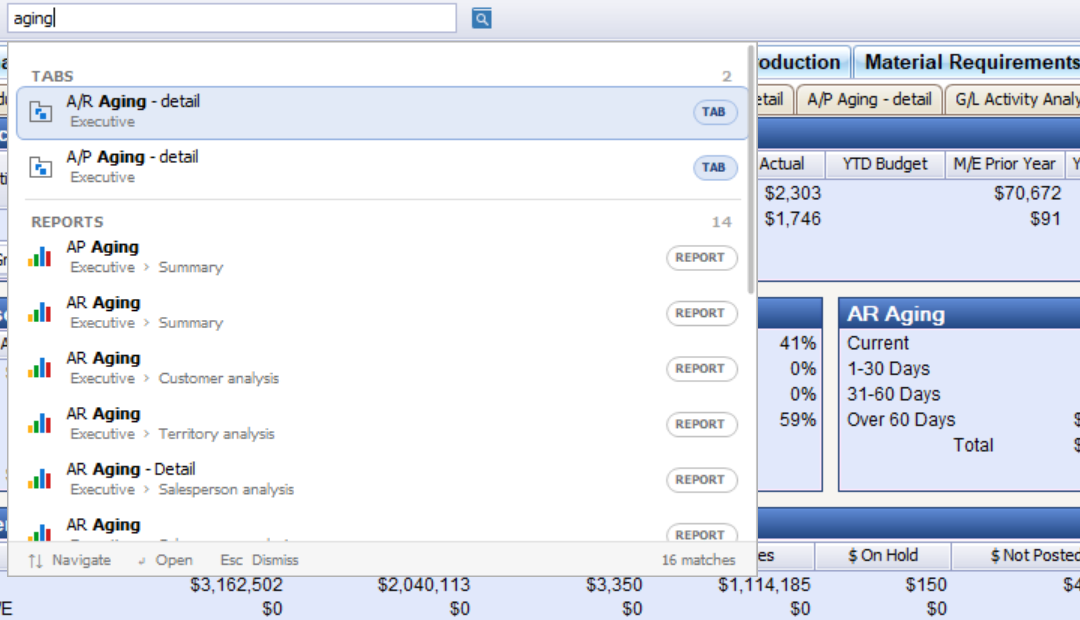
Tabs are listed before reports, and each entry shows where it lives, so two reports with the same caption on different tabs can be told apart. The footer keeps count of the matches.
Clicking the box with nothing typed lists everything available to you, which is a quick way to see the full set of tabs and reports on one screen.
What appears in the results
Only the modules that are on screen for you are offered. A module you are not licensed for, or that your permissions do not include, never appears in the results — quick search cannot be used to find out what else exists.
Getting started
The search box appears on the main toolbar after the upgrade. No setup or configuration is required.