G/L accounts when posting customer invoices
Adapted from the Leahy Consulting white papers "How do I know what G/L accounts will be used when posting customer invoices?", prepared for Macola® Progression (updated January 2006) and Macola® ES and 10 (updated July 2020).
Order Entry processes customer orders, prints the invoices and posts them. During posting, Macola® works out four general ledger accounts: sales, cost of sales, inventory and accounts receivable. Each one comes from a different file, and each one has its own fallback.
The four accounts
| Account | Comes from | Keyed by | Falls back to |
|---|---|---|---|
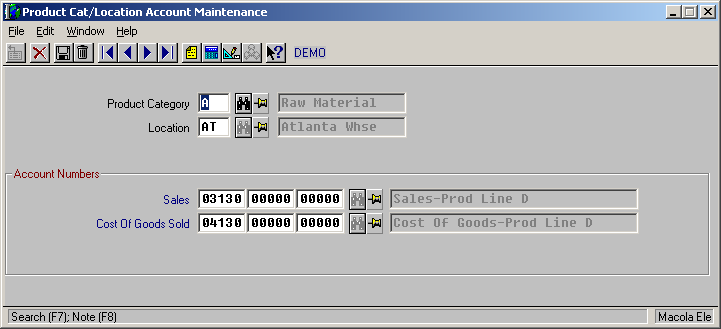
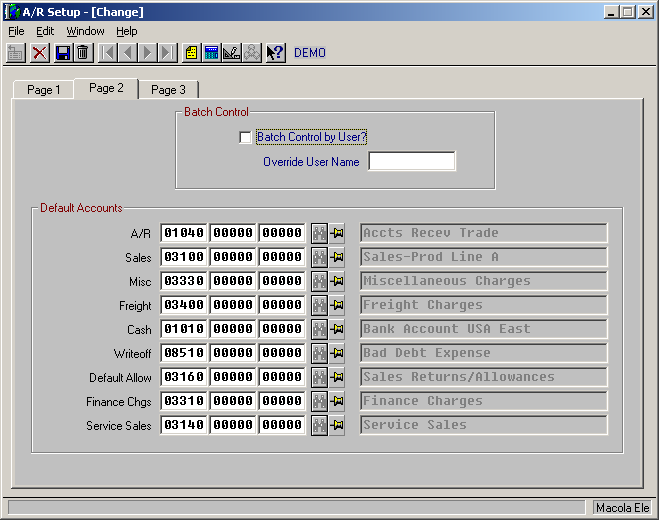
| Sales | Product Category/Location Account file | The item's product category and the shipping location | The default sales account in A/R Setup |
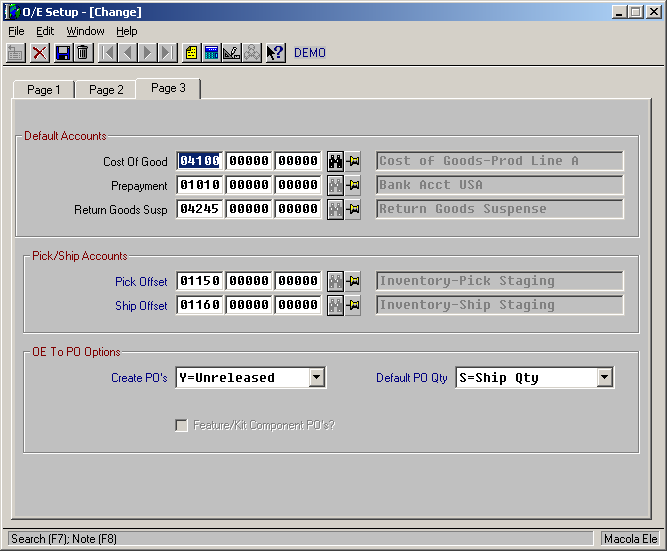
| Cost of sales | Product Category/Location Account file | The item's product category and the shipping location | The default account in O/E Setup |
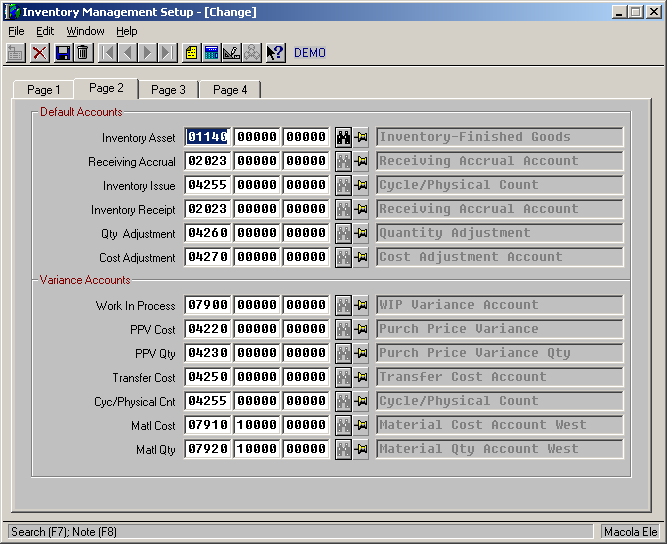
| Inventory | Material Cost Type/Location file | The item's material cost type and the shipping location | The default account in I/M Setup |
| Accounts receivable | The Customer Type file, per customer | The customer's type | The default account in A/R Setup |
Check before you post, not after
If you are unsure the right accounts will be used, print the pre-post report first. It shows exactly which accounts the posting will use, while there is still time to fix the item or the customer. In Macola® ES and 10 it is the Pre-Post Invoice List; in Progression it is the Pre-Post Edit report.
The screens
Macola® ES and 10
| File | Where it is |
|---|---|
| Product Category/Location Account | System menu → Distribution menu → Order Entry → Product Cat/Loc Account |
| Material Cost Type/Location Account | System menu → Distribution menu → Inventory Management → Material Cost Type/Loc |
| A/R Setup | System menu → Company menu → Package Settings → Accounts Receivable → Default Accounts tab |
| O/E Setup | System menu → Company menu → Package Settings → Distribution → Order Entry Setup → Default Accounts tab |
| I/M Setup | System menu → Company menu → Package Settings → Distribution → Inventory Management Setup → Default Accounts tab |
All five screens are shown, with the account fields called out, in The set-up screens that hold G/L accounts.
Macola® Progression
| File | Where it is |
|---|---|
| Product Category/Location Account | Order Entry → Maintain → Product Cat/Loc Accnt |
| Material Cost Type/Location Account | Inventory Management → Maintain |
| A/R Setup | Accounts Receivable → Maintain → A/R Setup → page 3 |
| O/E Setup | Order Entry → Maintain → O/E Setup → page 3 |
| I/M Setup | Inventory Management → Maintain → I/M Setup → page 2 |
Tip
Next step. Once invoices post to the right accounts, the remaining question is whether A/R agrees with the general ledger. Reconciling A/R to the general ledger covers the report to use and the entries that put the two out of step.
Support & contact
Our team is glad to help with anything from a quick question to a full implementation.
- PULSE software support — (513) 723-8095 · [email protected]
- Sales & product questions — (513) 723-8091 · [email protected]
- Consulting & Macola services — (513) 723-8094 · [email protected]