The set-up screens that hold G/L accounts
Adapted from the Leahy Consulting white paper "Macola® manufacturing set-up screens that require general ledger account entries", updated June 2019. Much of the account detail was taken from the Macola® on-line help and edited for readability.
Seven screens in Macola® ES and 10 hold the general ledger accounts that distribution and manufacturing transactions post to. Between them they decide where every inventory movement, sale, receipt and shop-floor hour lands in the general ledger. This page walks each screen, then lists — account by account — which transactions post to it, whether the posting is normally a debit or a credit, and what the offsetting account is.
The two that carry the most weight are Material Cost Type/Location Maintenance and Work Center Account Group. Between them they dictate the majority of Shop Floor Control entries.
Material Cost Type/Location Account Maintenance
Material Cost Type/Location Maintenance tracks inventory costs by material cost type within a location. If you run multiple locations and track costs within each one, enter a material cost type record for every location code. I/M distributions to the G/L are based on the cross-reference of the transaction's location and the item's material cost type. When a matching record exists, the distributions go to those accounts; when one does not, Macola® falls back to I/M Setup.
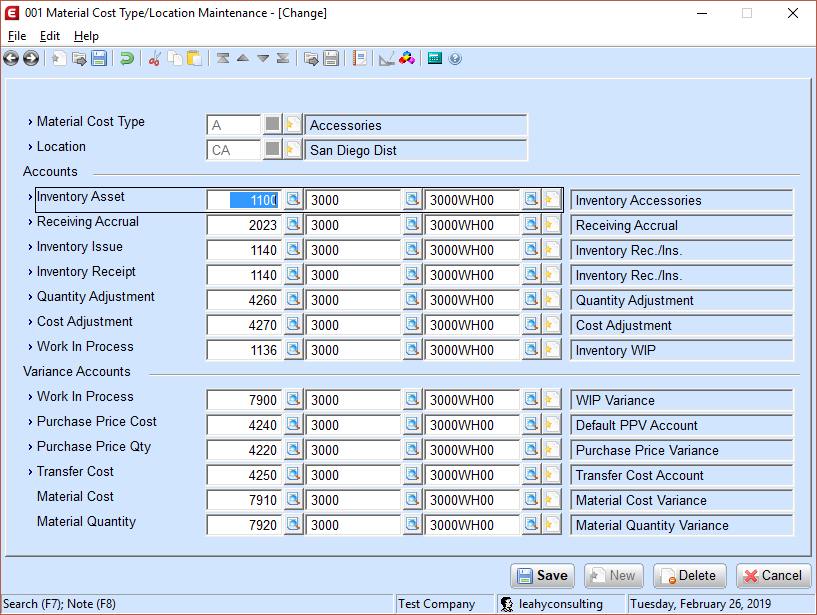
Inventory Asset Account
The Inventory Asset Account represents the value of inventory. It is debited as inventory increases and credited when inventory is depleted.
| Type of transaction | Normal distribution | Offset distribution account |
|---|---|---|
| IM Trx R=Receipt | Debit | Inventory Receipt |
| IM Trx I=Issue | Credit | Inventory Issue |
| IM Trx T=Transfer | Credit From Location, Debit To Location | Asset, Transfer Cost |
| IM Trx C=Cost Adj | Credit cost decrease, Debit cost increase | Cost Adjustment |
| IM Trx Q=Qty Adj | Credit negative adj, Debit positive adj | Quantity Adjustment |
| IM Phys/Cycle Count | Credit negative adj, Debit positive adj | Quantity Adjustment |
| OE Posting Invoices | Credit (non Confirm Pick/Ship setting) | Cost of Goods Sold |
| OE Credit Memos | Debit at credit-memo entry (not from RMA) | Cost of Goods Sold |
| OE Confirm Pick | Credit | Pick Offset |
| OE Confirm Ship | Credit | Ship Offset |
| OE RMA Receipt | Debit | Inventory Receipt |
| PO Receipt | Debit | Receiving Accrual |
| PO Receipt (Inspection) | Debit R/I Asset | R/I Receiving Accrual |
| PO R/I Disposition | Credit R/I Asset, Debit stock or MRB asset | See the disposition note below |
| PO MRB Disposition | Credit MRB Asset, Debit Asset | See the disposition note below |
| BOM Print Costed Bill | Credit cost decrease, Debit cost increase | Cost Adjustment |
| POP Release Orders ¹ | Credit Asset of components | Debit WIP of parent |
| POP Unrelease Orders ¹ | Debit Asset of components | Credit WIP of parent |
| POP Report Production | Debit Asset of parent ² | Credit WIP or component Asset ¹ |
| POP Disassembly | Credit Asset of parent ² | Debit Asset of component ² |
| POP Adjust Material Issue | Debit/Credit component based on change | WIP Variance of parent |
| SFC Material Issue/Return | Credit on issue, Debit on return ³ | Debit/Credit WIP of parent ³ |
| SFC Online Picking | Credit component asset ³ | Debit WIP of parent ³ |
| SFC Material Reject | Debit component asset ³ | Credit WIP of parent ³ |
| SFC Act. Trx. — Backflush | Credit component asset, M count point ³ | Debit WIP of parent ³ |
| SFC Act. Trx. — Parent | Debit parent asset, Y count point ³ | Credit WIP of parent ³ |
| MCA Post Transactions | Debit/Credit parent based on quantity | Debit/Credit Material Qty ⁴ |
¹ Depends on the Create WIP setting when the POP order is released. With Create WIP = N, nothing is distributed at release and the component asset account is credited at reporting production instead. With W or Y, the distributions are made as listed.
² Any difference between the component cost (including value-added costs) and the parent cost goes to the WIP Variance of the parent item.
³ These distributions appear on the MCA Distributions to G/L report.
⁴ In an average-cost environment, posting the MCA transaction that closes a shop order puts any remaining variance in the inventory asset account when the on-hand quantity in the item location is greater than the completed quantity.
R/I and MRB dispositions post to several accounts
The receipt at P/O receiving distributes to R/I Asset (debit) and R/I Accrual (credit). Accepting quantities during the R/I disposition washes R/I Asset and R/I Accrual into the Asset and Accrual accounts of the stocking location. Moving quantities to the MRB location washes them again — R/I Asset (credit) and R/I Accrual (debit) against MRB Asset (debit) and MRB Accrual (credit). Quantities accepted through MRB wash MRB Asset (credit) and MRB Accrual (debit) into the stocking location's Asset (debit) and Accrual (credit). Scrap, Destroy and Return To Vendor post to the accounts defined on page two of Inventory Location Maintenance.
Receiving Accrual Account
Credited when items are received on purchase orders, and held until the vendor's voucher arrives. It offsets the distribution to Inventory Asset at P/O receiving, then Accounts Payable washes it when the voucher is processed.
| Type of transaction | Normal distribution | Offset distribution account |
|---|---|---|
| PO Receiving | Credit | Inventory Asset, PPV Suspense |
| AP Vouchering | Debit | A/P, PPV Qty and Cost |
The distribution varies with the inventory cost method in I/M Setup. PPV Suspense (from P/O Setup) is used only in a standard-cost environment, and takes the difference between the receipt cost and the cost on file in the item location. When receipt and voucher costs are equal, P/O receipt debits Inventory Asset and credits Receiving Accrual; A/P vouchering debits Receiving Accrual and credits Accounts Payable.
Changing this account does not touch existing purchase orders
The Receiving Accrual account is captured on the purchase order line from Material Cost Type/Location Maintenance at the moment the order is created. Changing it here leaves every existing purchase order pointing at the old account. The same is true of the PPV Cost and PPV Quantity accounts.
Inventory Issue Account
Debited when a miscellaneous issue is generated through the Enter Inventory Transactions screen in I/M. Inventory Asset takes the credit.
| Type of transaction | Normal distribution | Offset distribution account |
|---|---|---|
| IM Trx I=Issue | Debit | Inventory Asset |
Inventory Receipt Account
Credited when a miscellaneous receipt is generated through Enter Inventory Transactions in I/M, or through RMA receiving in O/E. Inventory Asset takes the debit.
| Type of transaction | Normal distribution | Offset distribution account |
|---|---|---|
| IM Trx R=Receipt | Credit | Inventory Asset |
| OE RMA Receipt | Credit | Inventory Asset |
Quantity Adjustment Account
Debited or credited when quantities change through physical counts or I/M adjustments, for the cost of the parts times the number adjusted. The direction follows the adjustment; Inventory Asset takes the offset.
| Type of transaction | Normal distribution | Offset distribution account |
|---|---|---|
| IM Trx Q=Quantity Adj | Debit negative adj, Credit positive adj | Inventory Asset |
| IM Physical/Cycle Count | Debit negative adj, Credit positive adj | Inventory Asset |
Cost Adjustment Account
Debited or credited when the cost of an inventory item changes. C=Cost Adjustment transactions in I/M, Print Costed Bill in Bill of Material, and Roll Select Cost Master in Standard Costing all change the item's inventory value, which means a distribution to Inventory Asset and to this account.
| Type of transaction | Normal distribution | Offset distribution account |
|---|---|---|
| IM Trx C=Cost Adj | Debit reduced cost, Credit increased cost | Inventory Asset |
| BOM Print Costed Bill | Debit reduced cost, Credit increased cost | Inventory Asset |
| SC Roll Select Cost Master | Debit reduced cost, Credit increased cost | Inventory Asset |
Work In Process Account
Holds the value of the material, labor and absorbed costs issued to a manufacturing order.
| Type of transaction | Normal distribution | Offset distribution account |
|---|---|---|
| POP Release Orders ¹ | Debit WIP of parent | Credit Asset of components |
| POP Unrelease Orders ¹ | Credit WIP of parent | Debit Asset of components |
| POP Report Production | Credit WIP ¹ ² | Debit Asset of parent ² |
| SFC Material Issue | Debit WIP of parent ³ | Credit Asset of component ³ |
| SFC Material Return | Credit WIP of parent ³ | Debit Asset of component ³ |
| SFC Online Picking | Debit WIP of parent ³ | Credit component asset ³ |
| SFC Material Reject | Credit WIP of parent ³ | Debit component asset ³ |
| SFC Act. Trx. — Backflush | Debit WIP of parent, M count point ³ | Credit component asset ³ |
| SFC Act. Trx. — Parent | Credit WIP of parent, Y count point ³ | Debit parent asset ³ |
| MCA Post Transactions | Debit/Credit depending on variance | Depends on the cost method |
In most average-cost environments remaining WIP posts to the Inventory Asset Account. In a standard-cost environment it posts to the WIP Variance account.
Work In Process Variance Account
Takes the postings when manufacturing costs differ from the cost of the parent.
| Type of transaction | Normal distribution | Offset distribution account |
|---|---|---|
| POP Complete Production | Debit/Credit WIP Variance ¹ | Debit parent asset, Credit WIP ¹ |
| POP Disassembly | Debit/Credit WIP Variance ² | Credit parent, Debit component ² |
| MCA Post Transactions | Debit/Credit WIP Variance | Debit/Credit WIP |
| MCA Std Cost Distribution | Debit/Credit WIP Variance | Depends on the source of the variance |
MCA Standard Cost Distribution splits the remaining WIP variance by where the variance came from, which can include the Material Cost Account, the Material Quantity Account and labor variance.
PPV Cost Account
Under the standard cost method, A/P uses the Purchase Price Variance Cost Account to accumulate the difference between the dollars invoiced and the item's standard cost. Under Average, Last, LIFO or FIFO it is the difference between the dollars invoiced and the receipt cost. Either way, PPV Cost is the dollar difference between the Receiving Accrual account and the Accounts Payable account at vouchering.
| Type of transaction | Normal distribution | Offset distribution account |
|---|---|---|
| AP Vouchering | Debit/Credit PPV Cost Account | Accounts Payable Account |
Receiving Accrual is always debited for the entire amount against the P/O line item, and Accounts Payable is credited for the entire amount vouchered. PPV Cost is debited when the amount vouchered against the line is greater than the amount in Receiving Accrual, and credited when it is less.
PPV Quantity Account
A/P uses the Purchase Price Variance Quantity Account for the difference between the quantity received and the quantity invoiced. It is used when the voucher quantity on page two of A/P → Enter Voucher Transactions is greater than the P/O receipt quantity and the line is invoiced in full.
Receive a P/O line for 10 at $8 — the same cost as the item location — then voucher it for 12 at $8. A/P is credited $96, Receiving Accrual is debited $80, and PPV Quantity takes the $16 difference.
PPV Quantity receives nothing when the voucher quantity is less than the receipt quantity. That difference stays on the books as received but not invoiced.
| Type of transaction | Normal distribution | Offset distribution account |
|---|---|---|
| AP Vouchering | Debit | Credit A/P, Debit Accrual |
Transfer Cost Account
Debited or credited for the difference in standard costs between locations. Any change in value for parts moved between locations is written here, against the FROM location.
An item costs $3.00 at location AA and $3.50 at location BB. Transfer 100 units from AA to BB and four distributions occur:
- Inventory Asset for location AA is credited $300.00
- Inventory Asset for location BB is debited $300.00
- Inventory Asset for location BB is debited a further $50.00
- Transfer Cost for location AA is credited $50.00
| Type of transaction | Normal distribution | Offset distribution account |
|---|---|---|
| IM Trx T=Transfer | Debit or Credit FROM location | Credit FROM asset, Debit TO asset |
Material Cost and Material Quantity Accounts
Both are used only by the Standard Cost Distribution application in Manufacturing Cost Accounting, when a shop order is closed. Material Cost takes the variance between the actual costs incurred on the shop order and the planned costs; Material Quantity takes the variance between the actual and planned quantity. Both offset to WIP Variance.
If you run POP rather than MCA
Production Order Processing does not use these two accounts. Point them at
the 999 suspense account that should never carry a balance — anything
that turns up there is worth a look.
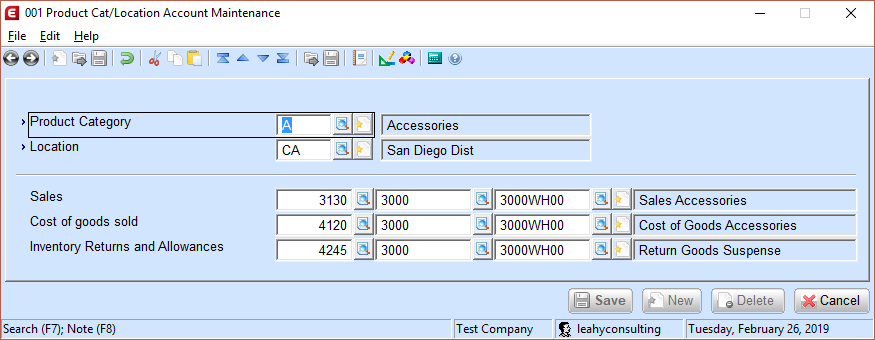
Product Category/Location Account Maintenance
This screen decides the accounts used when customer invoices are posted, keyed by the item's product category and the shipping location.
Order Entry Setup
The default accounts used when no Product Category and Location combination matches.
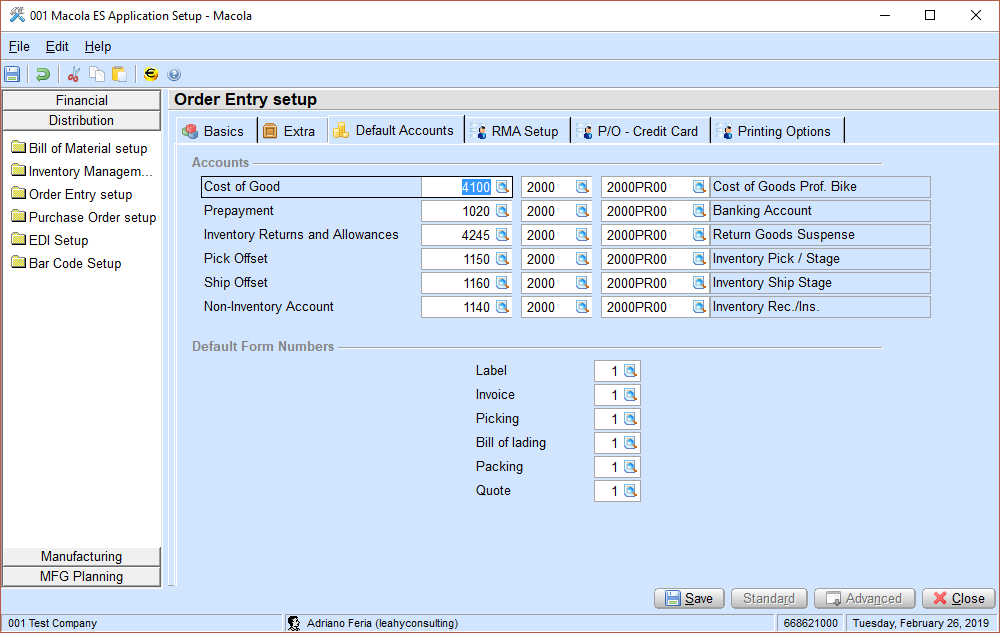
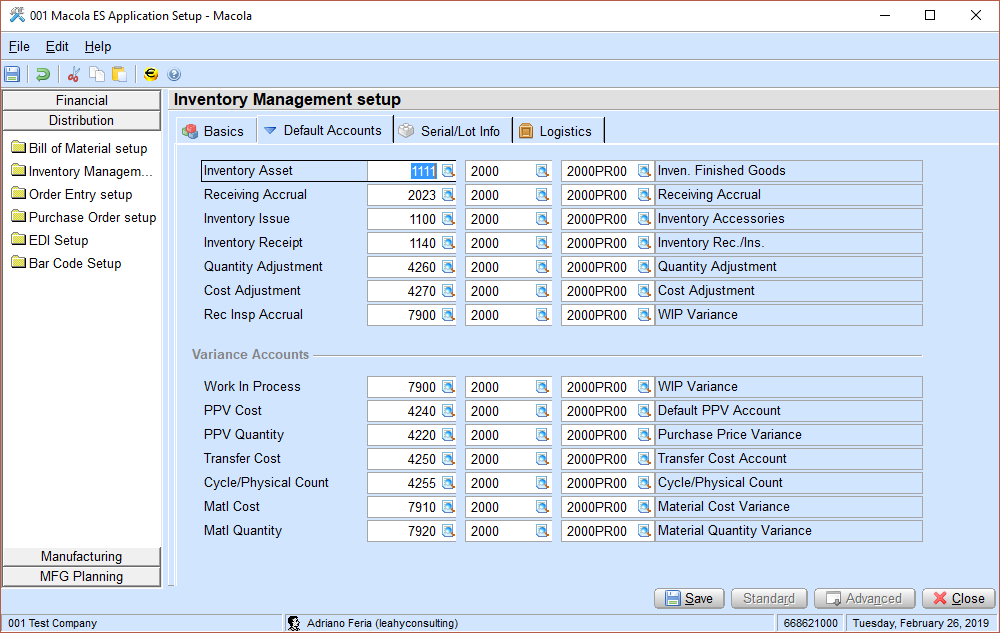
99999 account so set-up gaps in the item master show up straight away.Inventory Management Setup
The default accounts used when no valid Material Cost Type and Location combination matches.
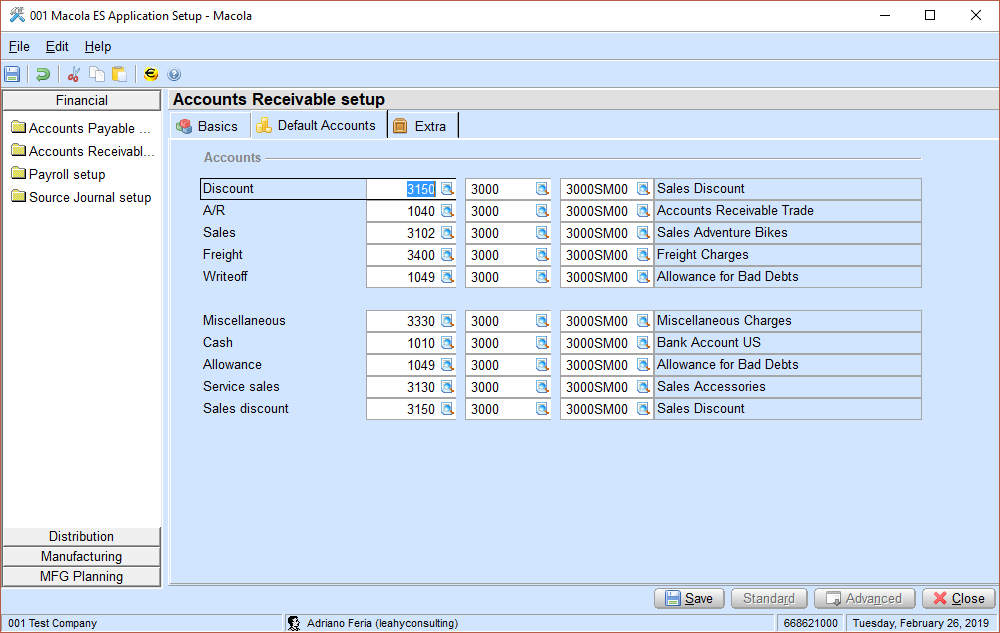
Accounts Receivable Setup
The default accounts used when no customer type record matches.
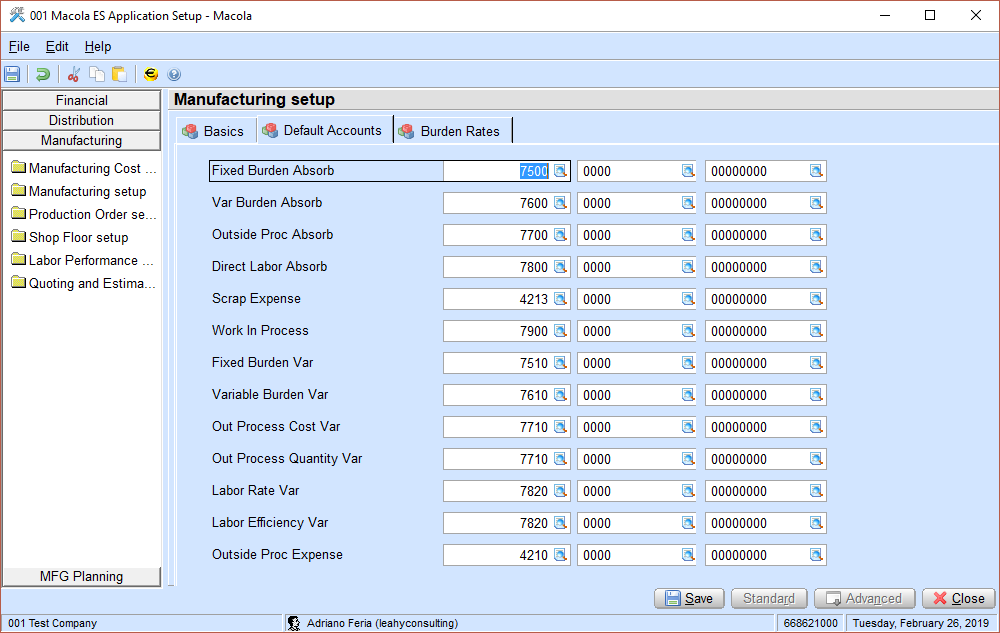
Manufacturing Setup
Holds the accounts used for each shop order.
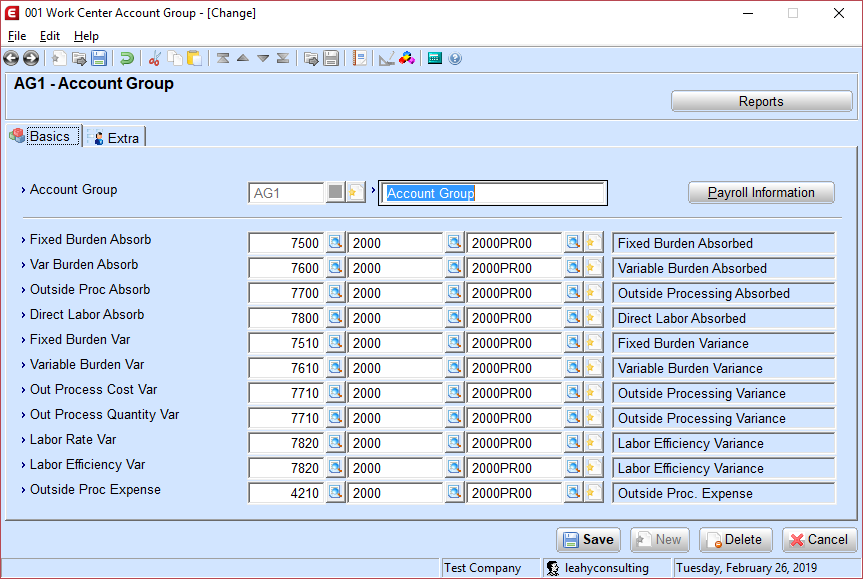
Work Center Account Group
Shop Floor Control users only. This screen sets the accounts used for each department and work center record, and with it every shop floor absorption and variance account.
Tip
Next step. Once the accounts are right, the question becomes whether every transaction actually reached the general ledger. Posting Shop Floor Control transactions to the general ledger covers the daily routine, and Avoiding inventory integrity errors covers the mistakes that put inventory and the G/L out of step.
Support & contact
Our team is glad to help with anything from a quick question to a full implementation.
- PULSE software support — (513) 723-8095 · [email protected]
- Sales & product questions — (513) 723-8091 · [email protected]
- Consulting & Macola services — (513) 723-8094 · [email protected]