G/L accounts for manual inventory transactions
Adapted from the Leahy Consulting white papers "How do I know what G/L accounts will be used when processing manual inventory transactions?", prepared for Macola® Progression (updated February 2004) and Macola® ES (updated April 2005).
Transfers, miscellaneous receipts and issues, and cost and quantity adjustments are keyed by hand, and every one of them posts to the general ledger. The processing rule is the same for all of them, and it is short.
The rule
- Macola® looks in the Material Cost Type/Location file for a record matching the item's material cost type and the transaction's location. The account to use depends on the type of transaction, so one record covers receipts, issues, adjustments and transfers.
- If no matching record exists, Macola® uses the corresponding accounts in I/M Setup.
If you carry more than one inventory account, you should be using the Material Cost Type/Location file. The setup screen alone cannot tell a raw material receipt from a finished goods receipt.
Which transactions this covers
Macola® ES and 10
Go to BOM_IM menu → Inventory Management menu → Enter Inventory Transactions.
- Transfers
- Miscellaneous receipts
- Miscellaneous issues
- Cost adjustments
- Quantity adjustments
- Bin adjustments
- Serial/lot adjustments
- LIFO/FIFO adjustments
The Material Cost Type/Location file is at System menu → Distribution menu → Material Cost Type/Loc. The fallback accounts are at System menu → Company menu → Package Settings → Distribution → Inventory Management setup → Default Accounts tab.
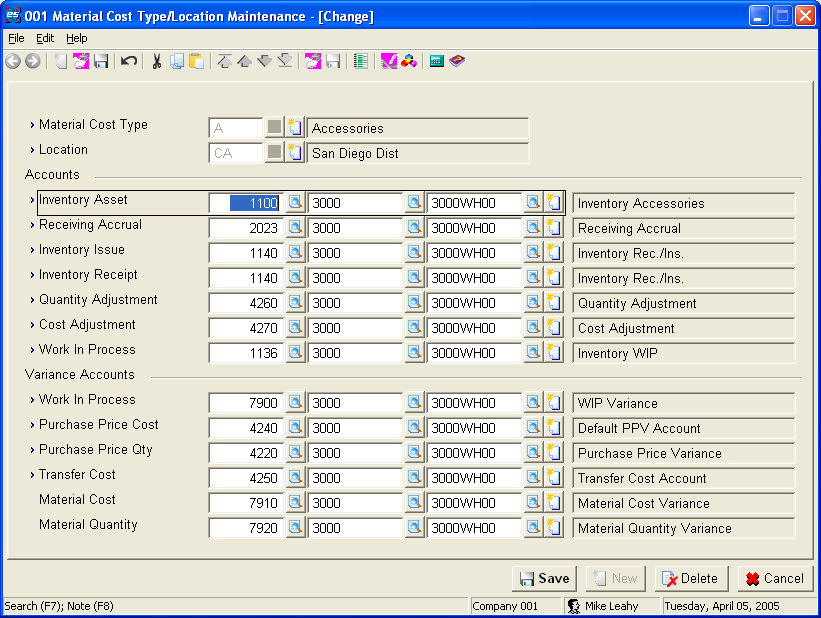
Macola® Progression
Go to Inventory Management → Trx → Transactions.
- Transfers
- Miscellaneous receipts
- Miscellaneous issues
- Cost adjustments
- Quantity adjustments
The Material Cost Type/Location file is at I/M → Maintain → Material Cost Type/Loc. The fallback accounts are at I/M → Maintain → I/M setup.
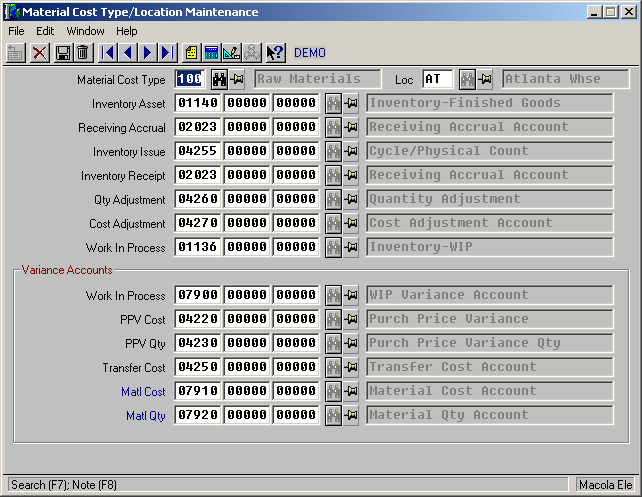
What posts where
| Transaction | Account debited | Account credited |
|---|---|---|
| R=Receipt | Inventory Asset | Inventory Receipt |
| I=Issue | Inventory Issue | Inventory Asset |
| T=Transfer | Inventory Asset of the TO location | Inventory Asset of the FROM location, plus Transfer Cost for any cost difference |
| C=Cost Adjustment | Inventory Asset on an increase, Cost Adjustment on a decrease | Cost Adjustment on an increase, Inventory Asset on a decrease |
| Q=Quantity Adjustment | Inventory Asset on a positive adjustment, Quantity Adjustment on a negative one | Quantity Adjustment on a positive adjustment, Inventory Asset on a negative one |
Physical and cycle counts post the same way as a quantity adjustment.
Manual transactions are usually a symptom
Manual inventory transactions are the most common cause of inventory getting out of step with the general ledger. If the other Macola® programs are being used properly, this screen should rarely be needed — on-hand corrections belong in the Physical Count and Cycle Count programs, and receiving and issuing belong in P/O and production. Fix errors where they happened instead. See Avoiding inventory integrity errors.
Transactions in other modules — order entry, purchase order and receiving, accounts payable, production order processing — follow different rules. They are covered in Posting customer invoices and P/O receiving, A/P vouchering and POP production reporting.
Support & contact
Our team is glad to help with anything from a quick question to a full implementation.
- PULSE software support — (513) 723-8095 · [email protected]
- Sales & product questions — (513) 723-8091 · [email protected]
- Consulting & Macola services — (513) 723-8094 · [email protected]