Cost Master Maintenance field reference
Adapted from the Leahy Consulting field list "Cost Master Maintenance — List of Fields". The original listed every field alphabetically; here the fields are grouped the way the screen presents them, because the four cost columns explain each other.
Cost Master Maintenance holds the standard costing figures for an item. Most of the screen is display-only — the values are produced by the Standard Costing programs rather than keyed — and knowing which of the four columns you are allowed to type in is most of what you need.
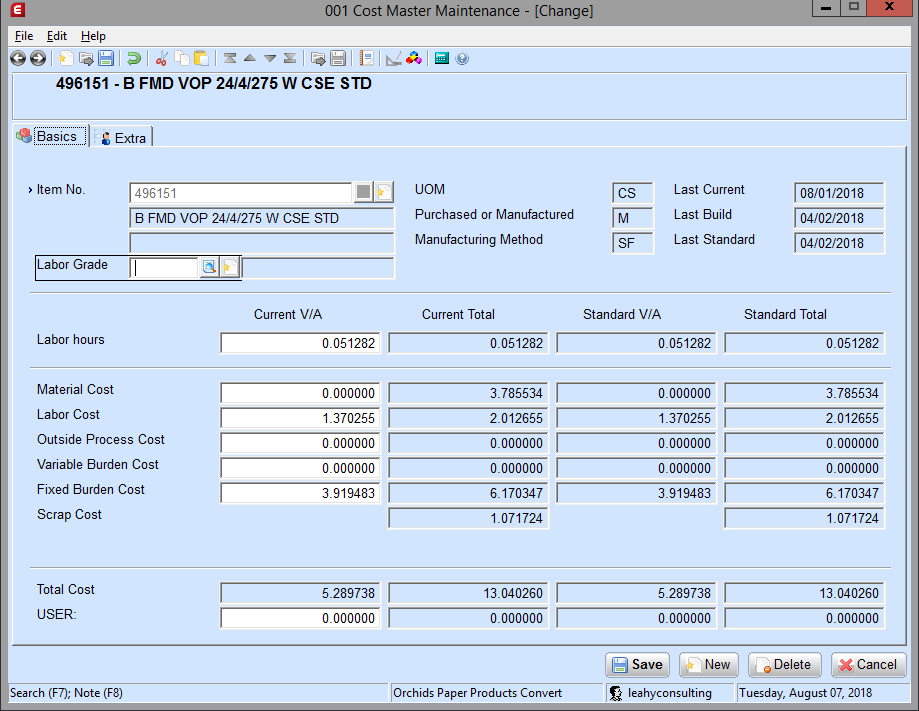
The four columns
The whole screen turns on two distinctions.
Value added versus total. A V/A figure is the cost added at this assembly level only — it excludes everything coming from lower levels of the bill of material. A Total figure includes the lower levels, rolled up by the Cost Build-Up.
Current versus standard. Current figures are what you are building towards — the values being set up for the next annual standardization. Standard figures are what is in force as this year's standard. Rolling current to standard is a deliberate act: the Current to Standard Roll, Roll Selected Cost Master application.
Every cost element below therefore appears four times. The Current V/A column is the only one that accepts typing, and even there some rows are calculated.
Item identification
| Field | Notes |
|---|---|
| Item No. and description | The item this cost master belongs to |
| Labor Grade | Keyable. Enter the labor grade S/C should use to calculate the value-added labor cost. Leave it blank and Recalculate V/A Labor from Cost Master recalculates the current value-added labor cost from the labor grades on each routing operation — but with no routing and no labor grade, S/C cannot determine the cost at all |
| Labor grade description | Display-only, from Labor Grade Maintenance |
| UOM | Display-only, from Item Master Maintenance. Blank means either the item is not in the Item Master table or no unit of measure was defined |
| Purchased or Manufactured | Display-only — P or M, set in Item Master Maintenance |
| Manufacturing Method | Display-only — OE (Order Entry), PP (Production Order Processing) or SF (Shop Floor Control). Copied from the Item Master when Create Cost Master runs. Items with method PP are updated by Recalc V/A Cost from POP |
| Last Current | Display-only. The date the cost master was last updated |
| Last Build | Display-only. The date Cost Build-Up was last run on current costs |
| Last Standard | Display-only. The date the standard V/A and standard total figures were last set from the corresponding current figures, by Current to Standard Roll |
Items that are not in the Item Master still work
S/C treats any Cost Master record for an item not in the Inventory Item table as a manufactured item with a manufacturing method of SF. That is what lets you estimate costs for items that do not exist yet.
Cost elements
Labor hours
The number of hours required to produce each item. Key it in Current V/A; labor hours are usually zero for purchased parts and for parts manufactured in Production Order Processing. The other three columns are display-only and can be positive or negative.
Recalculate V/A Labor from Cost Master uses the current labor grade together with this figure to calculate the item's current value-added labor cost.
Material cost
The direct material cost added at that level of the product structure.
Key Current V/A for purchased parts that have no lower-level material costs. You can enter material cost for items not included in Standard Costing as value-added material cost on each parent they appear in, but it is normally better to bring the item into S/C instead.
Running Roll to Material Cost copies the average, last or standard cost from the Item/Location table into this field for items with a manufacturing method of OE.
Labor cost
The labor cost for this item at this level of the bill of material. Generally zero for purchased parts.
For items manufactured in POP, this corresponds to value-added costs entered in POP with cost class L — so you would not normally key this cost class here.
Outside process cost
The cost of outside operations such as plating, painting or heat treating that occur while creating this item. If a routing for this item includes plating by an outside vendor, that cost goes here.
Variable burden cost
Indirect costs affected by the quantity produced, at this level of the bill of material. Generally zero for purchased parts.
Running Roll to Material Cost on current costs zeros this field for items with a manufacturing method of OE.
Fixed burden cost
The portion of production-related expense that does not vary with quantity produced — rent, real estate taxes and the like. Generally zero for purchased parts. All four columns are display-only except Current V/A.
Recalc V/A Costs from SPR sets the current value-added fixed burden for manufactured items; Recalc V/A Cost from POP sets it for purchased items; Roll to Material Cost zeros it for items with a manufacturing method of OE.
Landed cost
Display-only except Current V/A, and hidden entirely unless the Landed Costs check box is ticked on the Inventory Management Setup screen.
S/C uses this to track landed costs for purchased items. If Purchase Order marks a landed cost to be included in the unit cost, S/C does not duplicate it here. If the landed cost is not included in the unit cost, the Roll Cost application can store it here. Landed cost is normally entered only for purchased items — those with a Purchased or Manufactured value of P — that have no lower-level material costs.
Scrap cost
Display-only in every column. The sum of all scrap costs accumulated through the product structure of a manufactured item, based on the scrap factor stored for each component times that component's current total material cost. Fixed scrap quantities stored on the product structure also feed it.
There is no V/A scrap figure to key — scrap is derived.
Total cost
Display-only in every column. The sum of material cost, labor cost, outside process cost, variable burden cost, fixed burden cost and landed cost within that column. S/C updates the total whenever a value in the column changes.
User-defined field
An additional cost accumulator for tracking something else — weight or freight, for example. It is defined on the Standard Costing Setup screen, and S/C hides the field entirely unless Display User Defined Field? is ticked there.
Key Current V/A (size 7.6, signed). Costs in the user-defined field are rolled up during Cost Build-Up but are not included in the item's total actual cost.
Support & contact
Our team is glad to help with anything from a quick question to a full implementation.
- PULSE software support — (513) 723-8095 · [email protected]
- Sales & product questions — (513) 723-8091 · [email protected]
- Consulting & Macola services — (513) 723-8094 · [email protected]